Medical & Academic Research
Reveal provides two complementary capabilities for healthcare and research use cases:
- OpenEMR Integration — connect to an OpenEMR instance to query live patient and clinical data using FHIR
- Academic Research Mode — augment Data Explorer queries with results from OpenAlex, PubMed, and Clinical Trials databases
OpenEMR integration is a licensed feature. Contact your administrator if it is not visible in your Integrations panel.
OpenEMR — Clinical Data Integration
OpenEMR is an open-source electronic health record (EHR) and practice management system. Reveal connects to OpenEMR via SMART on FHIR OAuth2, allowing clinicians to query patient records, surface drug safety alerts, review vitals and labs, and ask evidence-based clinical questions — all from within Reveal's chat interface.
Connecting to OpenEMR
- Go to Integrations in the left navigation
- Click Add new Integration and select OpenEMR
- Enter your OpenEMR instance URL (e.g.
https://your-openemr-instance.com) - Click Authorise — Reveal initiates the SMART on FHIR OAuth2 flow
- Log in to OpenEMR in the popup and approve access
- Reveal completes the connection and stores your access token securely
Selecting a patient
Once the OpenEMR connection is active, select it from the connection selector in Chat. A patient list appears in the Analyzer panel — search by name, date of birth, or patient ID and click a patient to scope the session to them.
After selecting a patient, Reveal opens the patient dashboard showing their demographics, active conditions, critical labs, and a live Intelligence Stream sidebar.
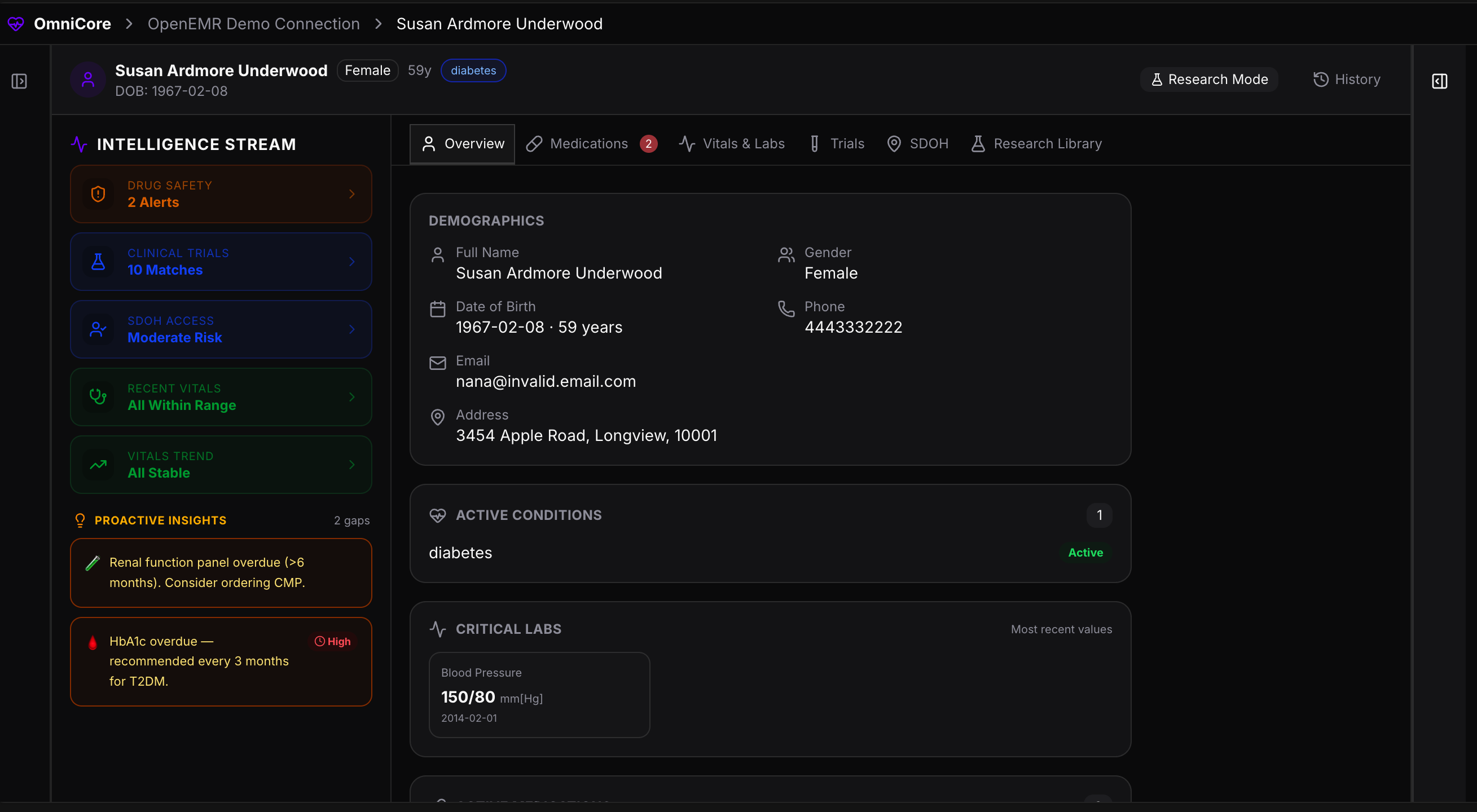
The dashboard is organised into tabs:
| Tab | What it shows |
|---|---|
| Overview | Demographics, active conditions, critical lab values, and proactive clinical insights |
| Medications | Active prescriptions with drug safety alerts, boxed warnings, and historical medications |
| Vitals & Labs | All recorded observations with a NEWS2 early warning score |
| Trials | Matching clinical trials from ClinicalTrials.gov based on the patient's conditions |
| SDOH | Social Determinants of Health risk score from CDC Social Vulnerability Index |
| Research Library | Saved academic papers relevant to this patient's case |
Intelligence Stream
The Intelligence Stream sidebar on the left of the patient dashboard runs continuously and surfaces five live signals:
| Signal | Description |
|---|---|
| Drug Safety Alerts | Active FDA boxed warnings and major safety notices for the patient's current medications |
| Clinical Trials | Open trials the patient may be eligible for based on their diagnoses |
| Clinical Risk | Automated risk classification (e.g. Moderate Risk) derived from vitals and conditions |
| Recent Vitals | Whether recorded vitals are within normal range |
| Vitals Trend | Direction of change — stable, improving, or worsening |
Below the signals, Proactive Insights flags care gaps and overdue actions — for example, overdue lab orders, HbA1c checks, or medication safety gaps — so clinicians can act without having to ask.
Vitals & Labs
The Vitals & Labs tab shows all FHIR Observation resources for the patient, including a computed NEWS2 Score (National Early Warning Score 2) at the top — a standardised early-warning indicator calculated from the patient's current vitals.
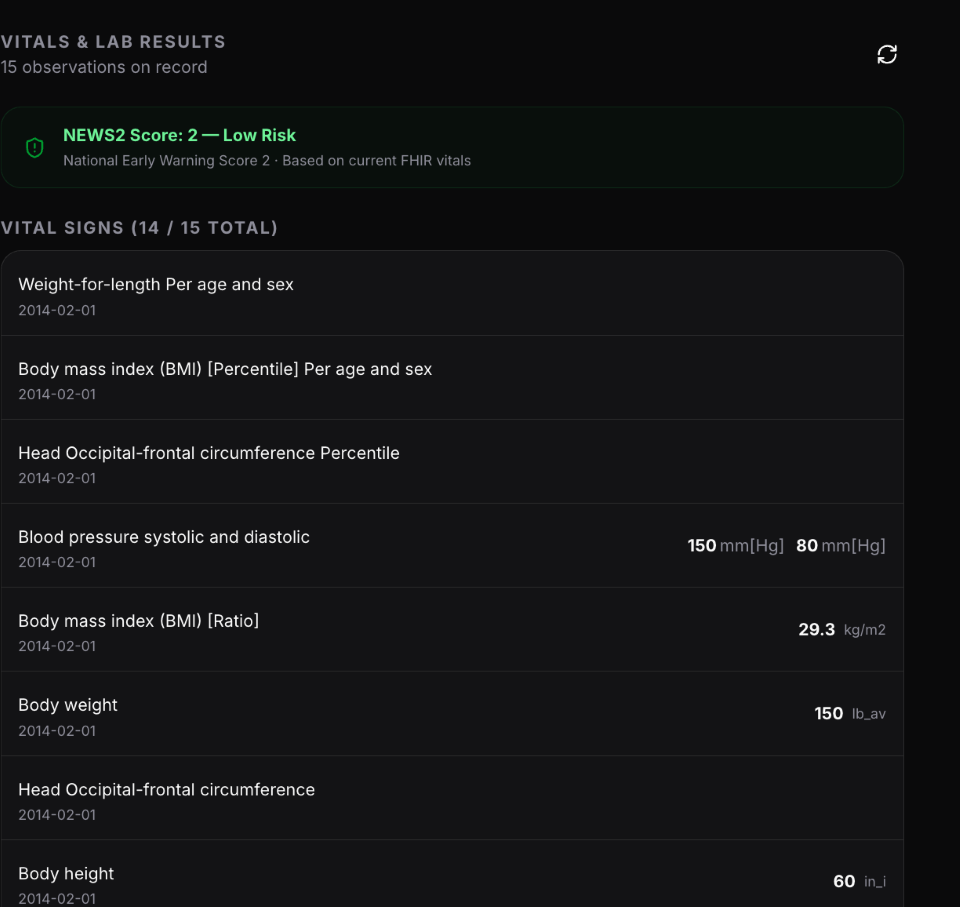
Each observation shows the measurement name, value with units, and the date it was recorded. All 15 (or more) observations are listed with the most critical values surfaced on the Overview tab.
Medications & Drug Safety Alerts
The Medications tab lists all active and historical prescriptions. Where the FDA has issued a boxed warning or major safety alert for a medication, the alert is shown inline — expanded and labelled by severity (Major / Moderate).
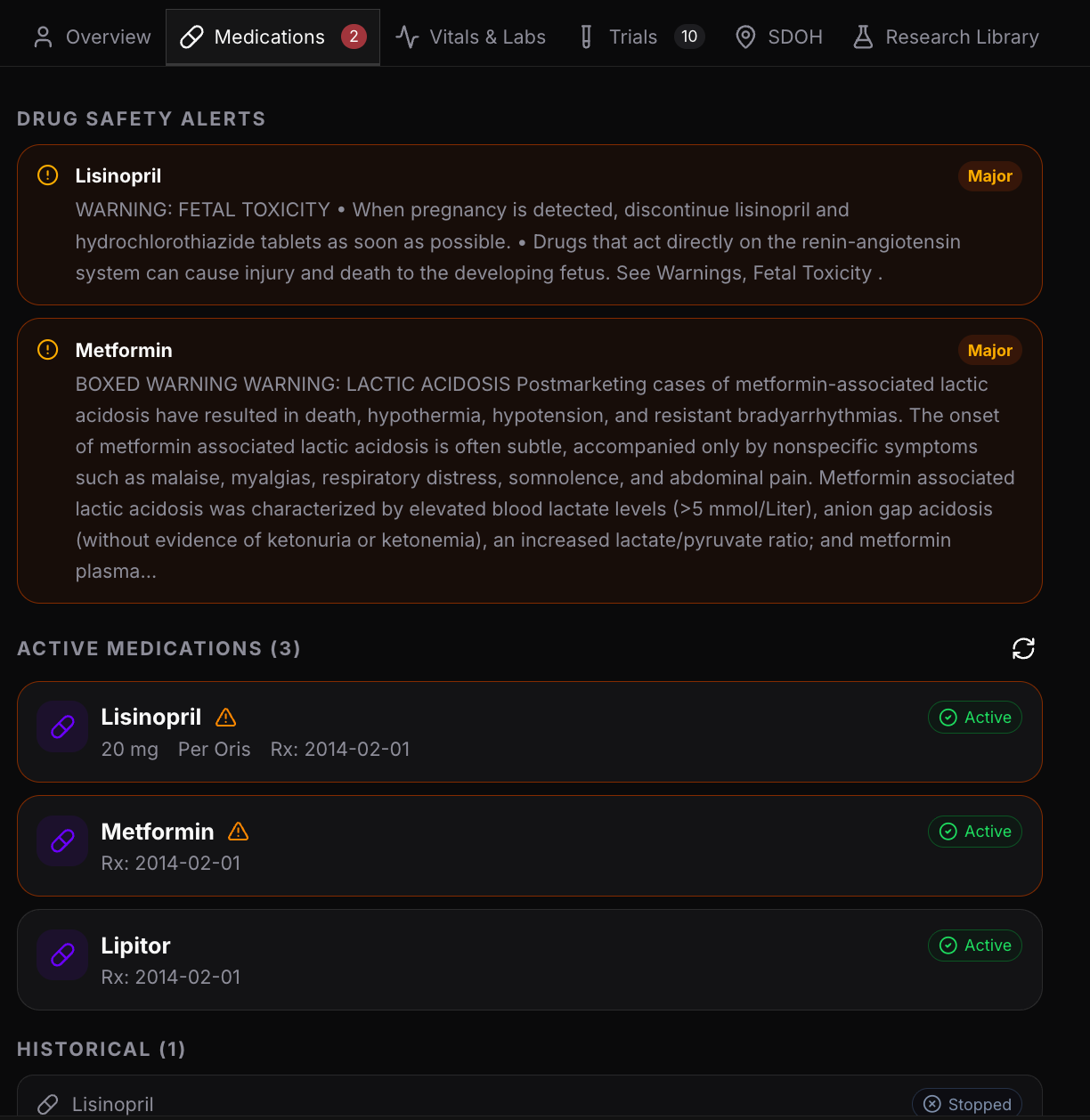
This means clinicians can see at a glance which of the patient's current medications carry active warnings — without needing to look them up separately.
Social Determinants of Health (SDOH)
The SDOH tab calculates the patient's Social Vulnerability Index from the CDC's SVI 2022 dataset, based on the patient's ZIP code. It breaks vulnerability down across four domains:
| Domain | What it measures |
|---|---|
| Socioeconomic Status | Income, poverty, unemployment, housing cost burden |
| Household Characteristics | Age (elderly/children), disability, language isolation |
| Racial & Ethnic Minority | Minority population, non-English speaking households |
| Housing & Transportation | Multi-unit structures, mobile homes, vehicle access, group quarters |
Each domain is rated LOW, MODERATE, or HIGH with its national percentile ranking.
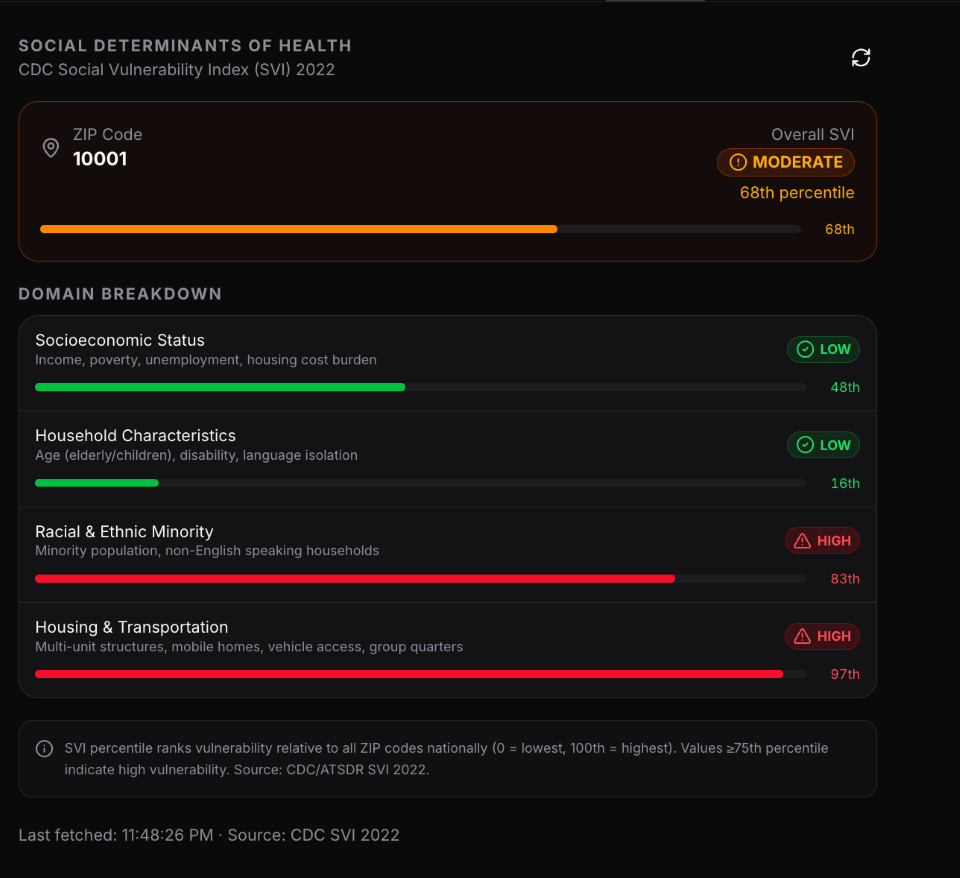
The overall SVI score is displayed at the top. Scores at or above the 75th percentile indicate high social vulnerability — factors that should be incorporated into care planning, medication adherence support, and follow-up strategies.
Asking clinical questions
With a patient selected, type any clinical question in the Chat input. Reveal's Clinical Decision Support (CDS) agent fetches the relevant FHIR resources and generates a structured answer using the patient's actual data — not generic information.
Example questions:
- "What medications is this patient currently prescribed?"
- "Summarise the lab results from the last 3 encounters."
- "Are there evidence-based alternatives to Metformin for diabetics with a boxed warning?"
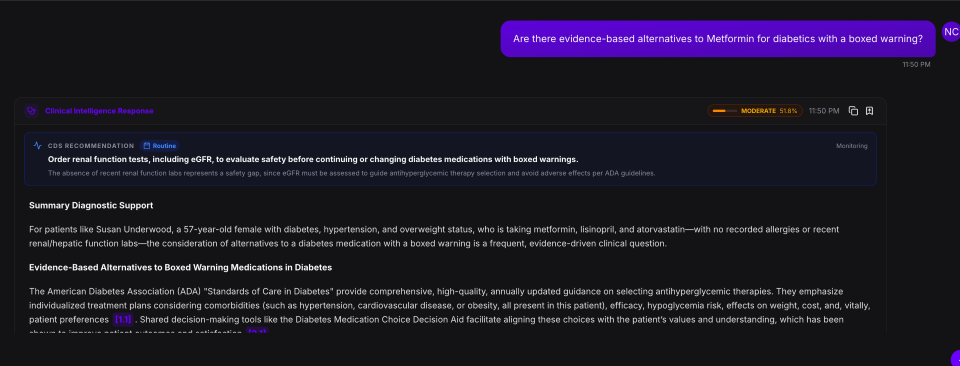
The response is labelled Clinical Intelligence Response and includes:
- A CDS Recommendation card at the top — a prioritised, actionable clinical suggestion (e.g. ordering a specific lab before continuing a medication)
- A Summary Diagnostic Support section grounding the answer in the patient's specific profile
- An evidence-based narrative drawing from ADA guidelines, clinical literature, and the patient's data — with inline citations linked to the sources used
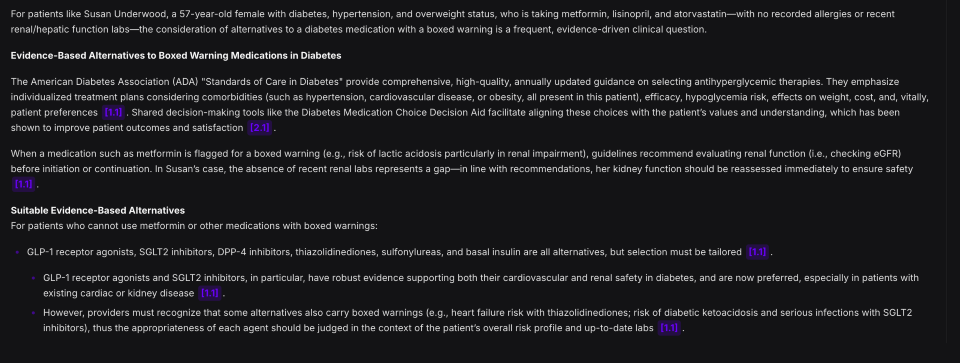
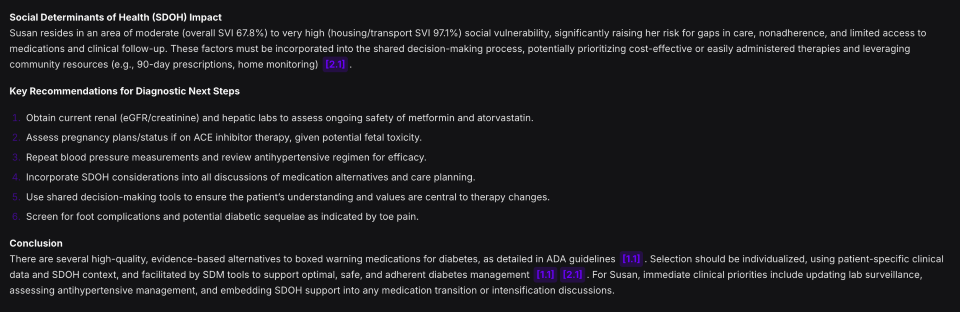
The answer also includes Key Recommendations for Diagnostic Next Steps — a numbered, prioritised action list the provider can work through, and a Conclusion that synthesises the findings into a clear clinical summary.
Glass-Box Reasoning & confidence factors
Every clinical response shows a confidence score (e.g. "MODERATE 51.8%"). Clicking Why did the AI say this? opens the Glass-Box Reasoning panel — a transparency layer that breaks down exactly how the answer was constructed.
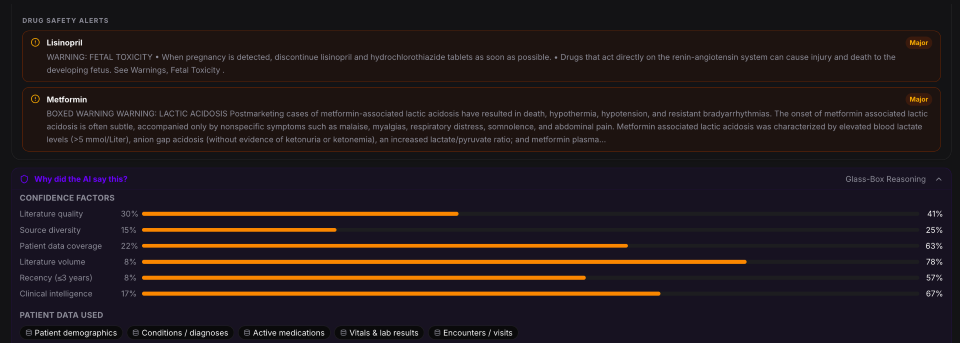
The panel shows:
- Drug Safety Alerts — FDA warnings for any medications mentioned in the response
- Confidence Factors — a breakdown of what contributed to the confidence score, including literature quality, source diversity, patient data coverage, literature volume, recency (≤3 years), and clinical intelligence — each shown with a before/after percentage bar
- Patient Data Used — which FHIR data categories were read to construct this answer (e.g. Patient demographics, Conditions/diagnoses, Active medications, Vitals & lab results, Encounters/visits)
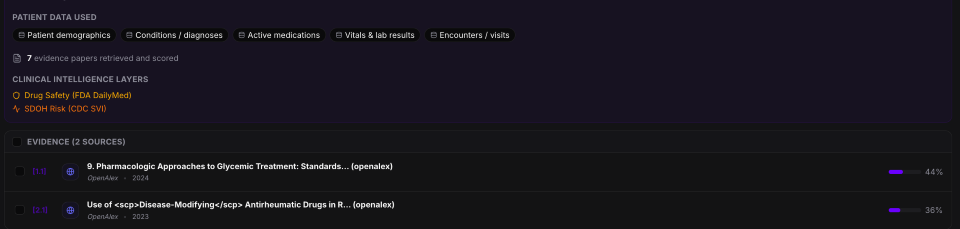
Below confidence factors, the panel shows:
- Clinical Intelligence Layers — additional data enrichments applied, such as Drug Safety (FDA DailyMed) and SDOH Risk (CDC SVI)
- Evidence Sources — the academic papers retrieved and scored to support the answer, with relevance percentages and links to OpenAlex or PubMed
Clinical Decision Support notice
Every clinical response includes two safety notices at the end:
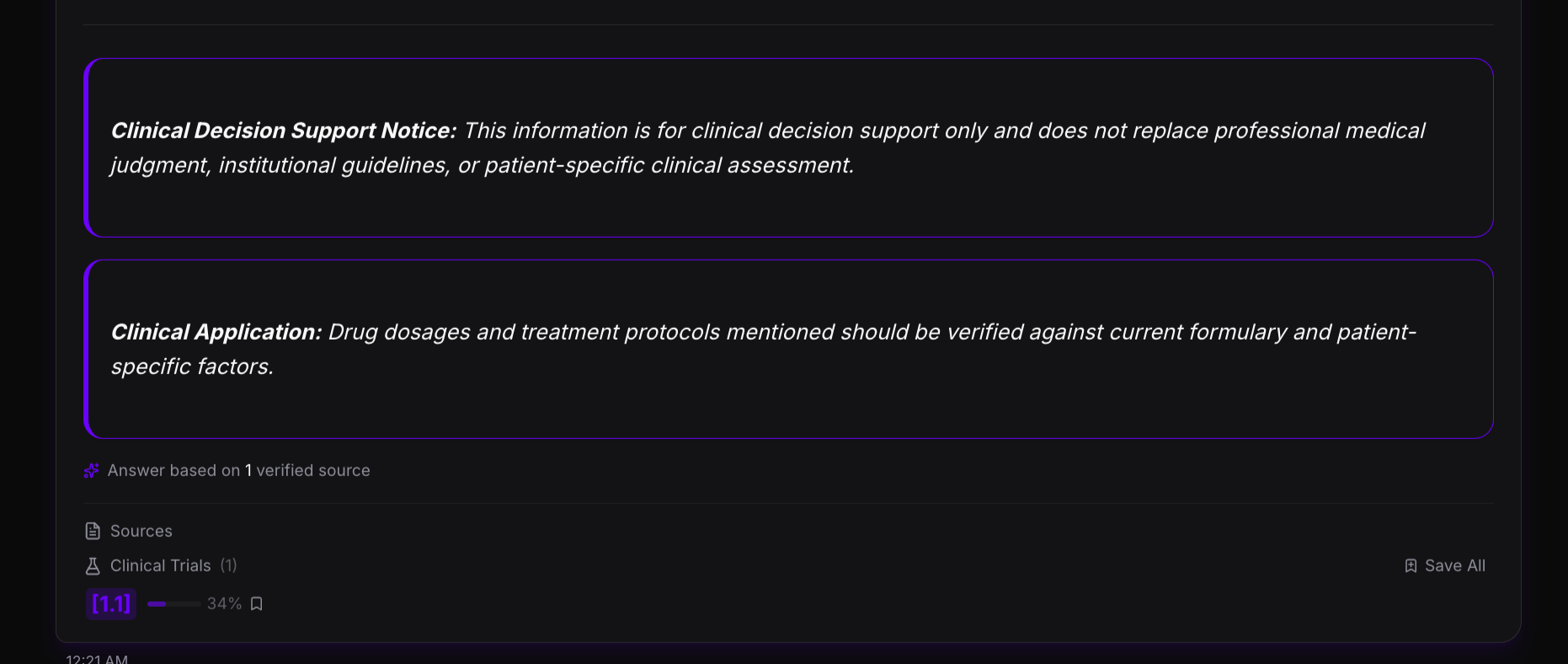
- Clinical Decision Support Notice — "This information is for clinical decision support only and does not replace professional medical judgment, institutional guidelines, or patient-specific clinical assessment."
- Clinical Application — "Drug dosages and treatment protocols mentioned should be verified against current formulary and patient-specific factors."
Below the notices, the Sources panel lists every verified source used, with relevance scores and a Save All option to add papers directly to the Research Library.
Token management
Reveal automatically refreshes OAuth tokens in the background. If a session expires, re-authorise the connection from the Integrations page.
What the CDS agent can retrieve
The agent uses a set of FHIR-backed tools to fetch clinical data on demand. It selects the right tool(s) based on your question and can call multiple tools in one turn.
| Tool | Data fetched |
|---|---|
| get_patient_medications | Prescriptions, drugs, dosages, medication history |
| get_patient_immunizations | Vaccination records and immunization status |
| get_patient_observations | Lab results, vital signs, test results, measurements |
| get_patient_conditions | Diagnoses, conditions, problem list, medical history |
| get_patient_encounters | Visit history, appointments, last seen date |
| get_patient_diagnostic_reports | Lab panels, imaging reports, pathology results |
Academic Research Mode
Research Mode augments Data Explorer queries with results from academic and clinical literature databases — useful for evidence-based analysis alongside your own documents.
Supported databases
| Database | Content |
|---|---|
| OpenAlex | Academic publications across all disciplines |
| PubMed | Biomedical and life sciences literature (NCBI) |
| Clinical Trials | Trial registrations and results from ClinicalTrials.gov |
Enabling Research Mode
- Open Data Explorer
- Click the Research toggle in the search bar — labelled "Search academic papers from OpenAlex & PubMed"
- Enter your query — Reveal searches both your document library and the external databases simultaneously
Results are grouped by source: your uploaded documents, OpenAlex papers, PubMed articles, and Clinical Trials entries. Each result includes a citation with a relevance score.
Saving research papers
Click Save on any research result to add it to your document library. Saved papers become searchable in future Data Explorer queries and Document Intelligence sessions. In an OpenEMR session, saved papers also appear in the patient's Research Library tab.
Configuration
Administrators can configure the research API keys in System Config:
| Setting | Purpose |
|---|---|
ai.research.openalex.api_key | OpenAlex API key for higher rate limits |
ai.research.openalex.mailto | Email for OpenAlex polite pool |
ai.research.pubmed.api_key | PubMed / NCBI API key |
ai.research.pubmed.email | Email for PubMed NCBI API |
OpenAlex and PubMed work without API keys at lower rate limits. Keys are recommended for production deployments.